
Email marketing that
answers what each contact did.
We map the lifecycle, write and design the emails, and build welcome, nurturing and win-back sequences that follow clicks, replies and orders in your CRM.
Every email answers
something Alex did.
Step 1 of 4
Alex signs up
An ad form creates the contact, with consent and source. The welcome sequence starts at once.
Step 2 of 4
The email answers
A click on Plan my route sends the next email. An open alone moves nothing.
Step 3 of 4
The record moves
The click, the booking and the ride are written to the contact. Alex is now Considering, and nurturing starts.
Step 4 of 4
The second purchase
A year after delivery, with no service booked, the service email goes out. Alex books and is a customer again.
Six stages,
each one a rule in your CRM.
Every contact sits in one stage. Your CRM puts them there by a rule, and each stage sends its own emails.
The rule in your CRM
Joined the list, no ride booked.
The emails it sends
Welcome, 3 emails
- Larkway Email 1Which ride would a Larkway replace?
- Larkway Email 2Three places to test-ride your route
- Larkway Email 3What riders say about the big hill
The rule in your CRM
Joined the list, no ride booked.
The emails it sends
Welcome, 3 emails
- Larkway Email 1Which ride would a Larkway replace?
- Larkway Email 2Three places to test-ride your route
- Larkway Email 3What riders say about the big hill
The rule in your CRM
Booked a test ride, not taken yet.
The emails it sends
Ride reminders, 2 emails
- Larkway Email 1Your test ride is on Saturday
- Larkway Email 2Missed your ride? Pick a new time
The rule in your CRM
Rode a Larkway, no order yet.
The emails it sends
Lead nurturing, 3 emails
- Larkway Email 1How did the hill feel, Alex?
- Larkway Email 2Which frame size fits you
- Larkway Email 3Paying monthly, explained
The rule in your CRM
Ordered in the last 12 months.
The emails it sends
After the order, 3 emails
- Larkway Email 1Your first week with a Larkway
- Larkway Email 2Three rides to try this month
- Larkway Email 3Lights and locks that fit
The rule in your CRM
A year since delivery, no service booked.
The emails it sends
Service reminders, 3 emails
- Larkway Email 1A year of riding. Time for a service?
- Larkway Email 2Service times near your route
- Larkway Email 3Brakes and battery: a last reminder
The rule in your CRM
No order, service or click in 18 months.
The emails it sends
Win-back, 2 emails
An order or a booking brings them back to Customer.
- Larkway Email 1We’ve missed you on the road
- Larkway Email 2A free check-up at your nearest store
Three rules behind
every sequence.
Clicks, not opens
Apple Mail can load an email’s images on arrival, so an open is a weak signal. Our branches follow clicks, replies and orders.
The whole history
A contact moves on what they did over weeks, not on one click, as the AI sales agent we built reads a buyer’s stage from the whole chat.
A holdout group
Where a segment is large enough, a small share gets no emails. The difference in orders between the two groups is what the sequence added.
A relevant reason
to order again.
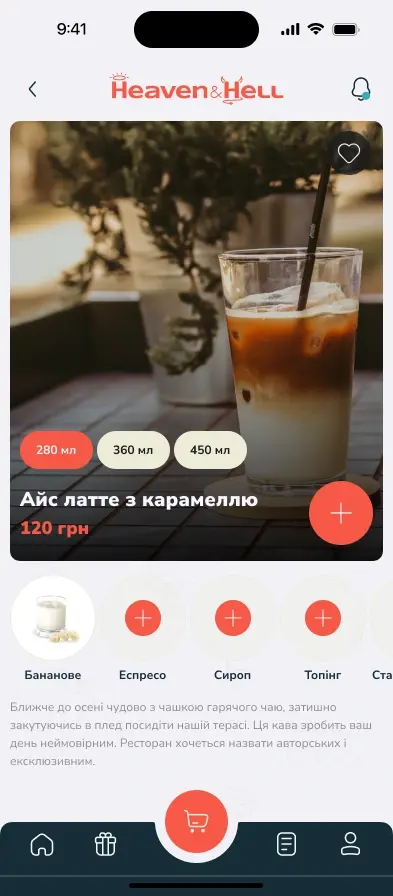
For Heaven&Hell, our retention work used push notifications, promotions and personal offers to bring guests back to the café’s app for the next order.
- 1.5×
- More frequent repeat purchases
A result of the combined brand, product and marketing programme.
 Heaven&HellPush notification
Your favourites, 20% off today
Today only
Acquisition
Instagram, Facebook, TikTok and SEO
App
Ordering in the app or at the kiosk
Return
Push, promotions and personal offers
The map first.
Then one sequence at a time.
Map the lifecycle
We talk to sales and support, read your CRM, and define each stage and what moves a contact on.
Plan segments and sequences
Triggers, branches, waits and exits for each sequence, agreed with sales: who gets an email and who gets a call.
Write, design and build
The emails and templates, the automation in your email platform, and the CRM fields and tasks it needs.
Test before launch
Every branch is run with test contacts, and rendering, links, unsubscribe and sending records are checked.
Measure and improve
Each sequence is read on orders and replies, against a holdout where volume allows, one change at a time.
Up to three sequences first. Then a monthly program.
1The setup
Up to three sequences, live and tested.
Welcome, nurturing or win-back, with the segments and templates, built in your email platform.
2Every month
New emails, read against orders.
A monthly plan, new emails and sequences, and a report on orders, bookings and replies.
Want every email
sent for a reason?
Tell us how leads and customers reach you today, what your CRM records and which emails go out now. We will come back with questions and the first sequence we would build.
Discuss your projectFrequently Asked Questions
It depends on the number of sequences and emails, whether templates are new, the state of your CRM data, any integration work and the reporting you want. We agree a fixed price for a clear scope, and a monthly scope if we keep running the program.
We work in the email platform and CRM you already use, with the access you grant. If you are still choosing, we write down what your sequences need, such as the triggers, the branches and the sync with your CRM, and compare the candidates against that list.
A newsletter goes to a list on a date you choose. A sequence starts when a contact does something, such as signing up, booking or buying, and each next email depends on what they did after the last one. Most programs need both, with rules for which one takes priority when a contact is in both.
Less than they used to. For Apple Mail users who turn on Mail Privacy Protection, remote content, including tracking images, loads when a message arrives, so an open is recorded whether or not the email was read. We use opens only as a rough health check and build branches on clicks, replies and purchases.
We check that your sending domain is authenticated with SPF, DKIM and DMARC and that marketing emails offer one-click unsubscribe. Google asks this of bulk senders to Gmail, about 5,000 messages a day or more, and asks them to keep spam complaints low. We email only people who agreed to hear from you, watch complaints, and stop emailing contacts who have not clicked or replied for a long time.
Our team does: copy, design and the templates, built so your team can edit the text later. The sample emails on this page were made by us for a fictional brand.
Yes, that is the point of the CRM connection. Stages, consent and unsubscribes are kept in step, a reply or a click can create a task for sales, and a contact in a sales conversation leaves the marketing sequences. When the systems need a custom connection, it is integration work our developers do.
We read each sequence on what it is for, such as bookings, orders or replies, recorded in your CRM. Where there is enough volume, a holdout group that gets no emails shows what the sequence added. Getting those events recorded reliably is part of our analytics and conversion tracking work.